一切头疼的起源是群晖对于 AME 的一次 更新
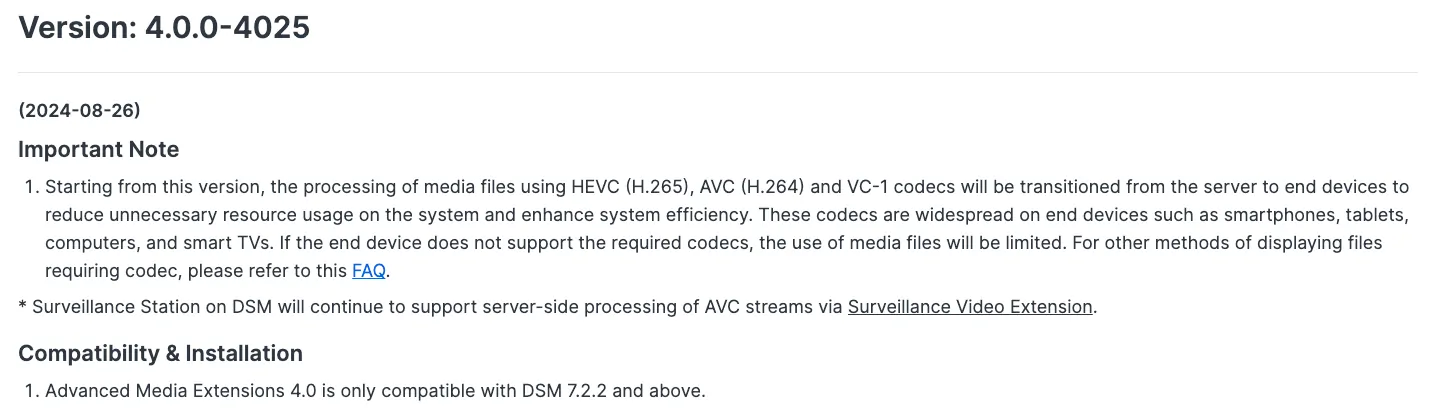
如描述中所述移除了 HEVC 的编解码,这意味着基于此的 HEIC 的封装也无法正常编解码,并导致在 Photos 组件中无法正常预览 iOS 常用的 HEIC 格式照片
HEIF can store images encoded with multiple coding formats, for example both SDR and HDR images. HEVC is an image and video encoding format and the default image codec used with HEIF. HEIF files containing HEVC-encoded images are also known as HEIC files and often use the
.heicfilename extension. Such files require less storage space than the equivalent quality JPEG. ——WIKIPEDIA
对此官方的解决办法是让用户安装一个浏览器插件和一个本地应用,以实现 HEIC 的预览,如果你用过老版本的 AME + Photos 就会理解新的解决方式有多么愚蠢
graph LR
    新[新链路] --> A[用户访问 Photos] --> B[插件下载 HEIC 到本地] --> C[本地转码 → JPG] --> D[回传 JPG 到 Photos]

    旧[旧链路] --> E[用户上传 HEIC] --> F[Photos 调用 AME] --> G[AME 转码 → JPG]

    style 新 fill:#d9f7be,stroke:#52c41a
    style 旧 fill:#ffd6d6,stroke:#f5222d
在社区中已经有人开发了相关 工具 强制让 AME 降级,原理是移除现有 AME v4,安装 AME v3,并注册版本号为 v30 以规避套件管理的自动升级
但在 7.2.2-72806 版本上,群晖阻止了老版本AME的激活,即便是正版也不行,因此我使用了黑群晖的强制激活脚本,这才得以降级
import hashlib
import os
import subprocess


r = ['669066909066906690', 'B801000000', '30']
s = [(0x3718, 0), (0x60A5, 1), (0x60D1, 1), (0x6111, 1), (0x6137, 1), (0xB5F0, 2)]


prefix = '/var/packages/CodecPack/target/usr'
so = prefix + '/lib/libsynoame-license.so'


print("Patching")
with open(so, 'r+b') as fh:
    full = fh.read()
    if hashlib.md5(full).digest().hex() != '09e3adeafe85b353c9427d93ef0185e9':
        print("MD5 mismatch")
        exit(1)
    for x in s:
        fh.seek(x[0] + 0x8000, 0)
        fh.write(bytes.fromhex(r[x[1]]))


lic = '/usr/syno/etc/license/data/ame/offline_license.json'
os.makedirs(os.path.dirname(lic), exist_ok=True)
with open(lic, 'w') as licf:
    licf.write('[{"attribute": {"codec": "hevc", "type": "free"}, "status": "valid", "extension_gid": null, "expireTime": 0, "appName": "ame", "follow": ["device"], "duration": 1576800000, "appType": 14, "licenseContent": 1, "registered_at": 1649315995, "server_time": 1685421618, "firstActTime": 1649315995, "licenseCode": "0"}, {"attribute": {"codec": "aac", "type": "free"}, "status": "valid", "extension_gid": null, "expireTime": 0, "appName": "ame", "follow": ["device"], "duration": 1576800000, "appType": 14, "licenseContent": 1, "registered_at": 1649315995, "server_time": 1685421618, "firstActTime": 1649315995, "licenseCode": "0"}]')


subprocess.run(['/usr/syno/etc/rc.sysv/apparmor.sh', 'remove_packages_profile', '0', 'CodecPack'])


apparmor = '/var/packages/CodecPack/target/apparmor'
if os.path.exists(apparmor):
    os.rename(apparmor, apparmor + ".bak")


print("Checking whether patch is successful...")
ret = os.system(prefix + "/bin/synoame-bin-check-license")
if ret == 0:
    print("Successful, updating codecs...")
    os.system(prefix + "/bin/synoame-bin-auto-install-needed-codec")
    print("Done")
else:
    print(f"Patch is unsuccessful, retcode = {ret}")
最终在 Photos 组件上恢复对 HEIC 文件的预览
Q.E.D.
评论
登录后即可发表评论